Posts

Showing posts with the label disk

Understanding File Systems

Image
Understanding File Systems in this computer not only computes data but also stores data. The issue of file structure and  data storage  is of prime concern. To solve this issue, manufacturers employ an effective storing and organization of the data on the computer called as a file system. The file system makes it easy to find and access the data. Data storage devices like hard disks or CD-ROMs can use the file system to store the data. The file system divides the file into smaller pieces and then stores them to  hard disks  or flash memory in clusters. A file system is a set of data types employed for: Storage Hierarchical categorization Management Navigation Access Recovering the data Major file systems include FAT, NTFS, HFS, Ext2, Ext3, etc. Users can access the files using the graphical user interfaces or command line user interfaces. File systems organize the data in the form of tree-structured directories. These are generally file cabinets and folders. Director...
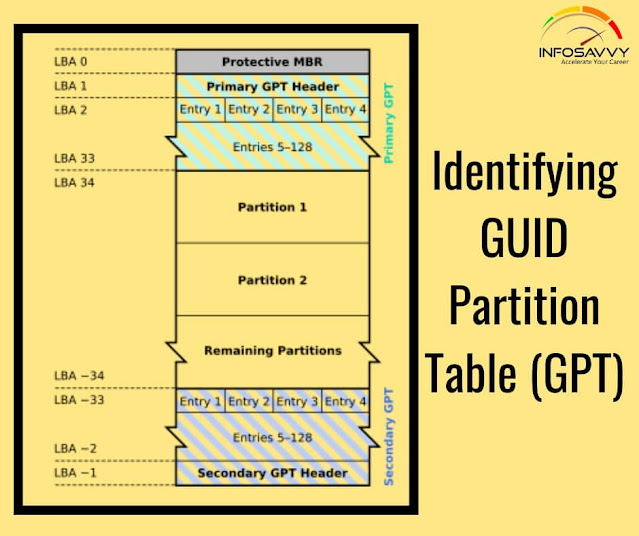
Identifying GUID Partition Table (GPT)

Image
Identifying GUID Partition Table (GPT) in this GPT header will help an  investigator  analyze the layout of the disk including the locations of the partition table, partition area, and backup copies of the header and partition table. Investigators can use cmdlets given below in Windows PowerShell to identify the presence of GPT: Get-GPT Get-GPT command helps investigator to analyze the GUID Partition Table data structure of the hard disk. It requires the use of the -Path parameter which takes the Win32 Device Namespace (ex.\\.\ PHYSICALDRIVE1) for the device from which it should parse the GPT. In case, the investigator uses the Get-CPT on a disk formatted with a Master Boot Record, it will display an error message prompting to use Get-MBR instead. Alternate Method: Open “Computer Management” application and click “ Disk Management ” on the left pane. Right-click on the primary disk (here, Disk 0) and then click Properties In the Device Properties window, click ‘Volumes” tab to...

What is the Booting Process?

Image
  Booting is the process of starting or resetting the computer when the user turns the system on. The process includes getting both the   hardware   and   software   ready and running. The booting process is of two types: Cold booting:   The process happening when we first turn on the computer. Also called as hard boot, this happens when user completely cuts the power supply to the system. Warm booting  is the process happening when we reset the computer. In this process, the user restarts the system via operating system. During the process of booting, the computer loads the operating system to its memory or RAM and prepares it for use. During initialization, the system switches on the BIOS and loads it onto the ROM. BIOS stores the first instruction, which is the command to perform the power-on self-test (POST). Under POST, the system checks the BIOS chip and CMOS RAM. If the POST detects no battery failure, it continues to start other parts of the CP...

Hard Disk Partitions

Image
  Hard Disk Partitions refers to the creation of  logical drives  for effective memory management and a partition is the logical drive for storing the data. Hidden partition created on a drive can hide the data. The inter-partition gap is the space between the primary partition and the secondary partition. If the inter-partition drive contains the hidden data, use disk editor utilities like Disk Editor to change the information in the partition table. Doing so will remove all the references to the hidden partition, which have been hiding it from the operating system. Another way of hiding the data is to place the  digital evidence  at the end of the disk by declaring a smaller number of bytes than the actual size of the drive. Disk Editor allows  investigator  to access these hidden or vacant areas of the disk. The partitions are of two types: Primary partition:  it is the drive that holds the information regarding the operating system, system are...