Posts

Showing posts with the label disks

Understanding File Systems

Image
Understanding File Systems in this computer not only computes data but also stores data. The issue of file structure and  data storage  is of prime concern. To solve this issue, manufacturers employ an effective storing and organization of the data on the computer called as a file system. The file system makes it easy to find and access the data. Data storage devices like hard disks or CD-ROMs can use the file system to store the data. The file system divides the file into smaller pieces and then stores them to  hard disks  or flash memory in clusters. A file system is a set of data types employed for: Storage Hierarchical categorization Management Navigation Access Recovering the data Major file systems include FAT, NTFS, HFS, Ext2, Ext3, etc. Users can access the files using the graphical user interfaces or command line user interfaces. File systems organize the data in the form of tree-structured directories. These are generally file cabinets and folders. Director...
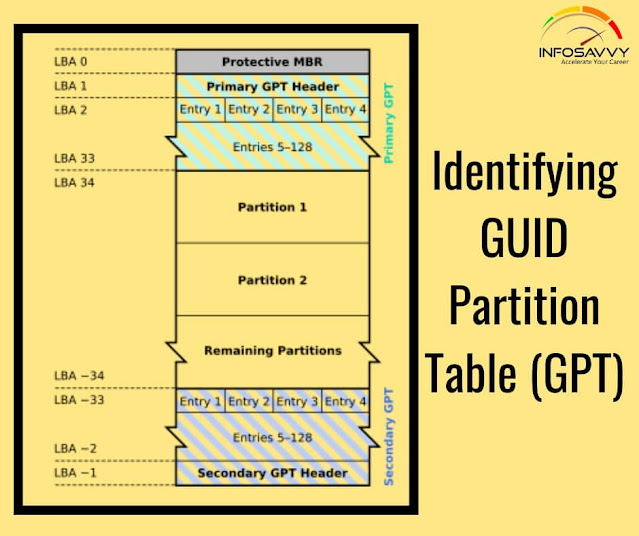
Identifying GUID Partition Table (GPT)

Image
Identifying GUID Partition Table (GPT) in this GPT header will help an  investigator  analyze the layout of the disk including the locations of the partition table, partition area, and backup copies of the header and partition table. Investigators can use cmdlets given below in Windows PowerShell to identify the presence of GPT: Get-GPT Get-GPT command helps investigator to analyze the GUID Partition Table data structure of the hard disk. It requires the use of the -Path parameter which takes the Win32 Device Namespace (ex.\\.\ PHYSICALDRIVE1) for the device from which it should parse the GPT. In case, the investigator uses the Get-CPT on a disk formatted with a Master Boot Record, it will display an error message prompting to use Get-MBR instead. Alternate Method: Open “Computer Management” application and click “ Disk Management ” on the left pane. Right-click on the primary disk (here, Disk 0) and then click Properties In the Device Properties window, click ‘Volumes” tab to...

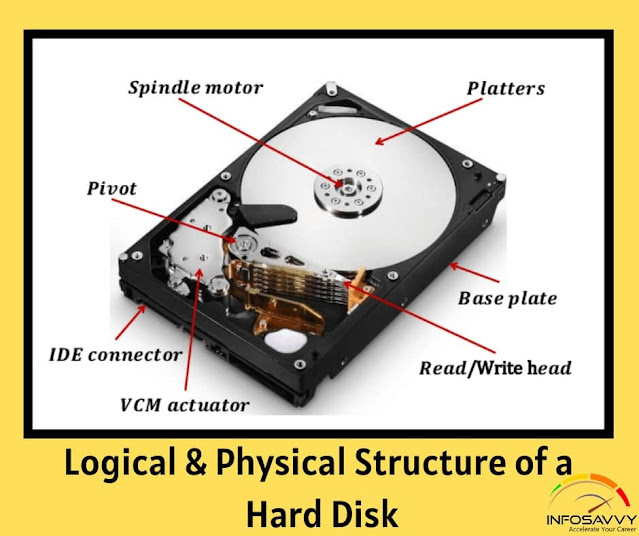
Logical & Physical Structure of a Hard Disk

Image
   In this article explain Logical & Physical Structure of a Hard Disk there components uses. Physical Structure of a Hard Disk The main components of hard disk drive are: Platters:  These are disk like structures present on the hard disk, stacked one above the other and store the data Head:   It is a device present on the arm of the hard drive that reads or writes data on the magnetic platters, mounted on the surface of the drive Spindle:  It is the spinning shaft on which holds the platters in a fixed position such that it is feasible for the read/write arms to get the data on the disks Actuator:  It is a device, consisting of the read-write head that moves over the hard disk con to save or retrieve information Cylinder These are the circular tracks present on the platters of the disk drive at equal distances from the center Related Product :  Computer Hacking Forensic Investigator | CHFI Physical Structure of a Hard Disk (Cont’d) A hard disk con...